


GA4google analyticsgoogle analytics 4
Using GA4 to Inform a Website Redesign
Are you planning a website redesign? Don’t design in the dark- first review how you can query Google Analytics 4 data to light up and inform your website redesign!


Are you planning a website redesign? Before diving in, have you conducted thorough research using previously collected user data? In today’s data-driven world, there’s no excuse not to use the valuable insights already collected in your GA4 account. This powerful tool goes beyond simple traffic stats, offering deep insights into user behaviour that can revolutionise your website redesign.
This blog post is a guide to leveraging questions you can ask to uncover GA4’s data magic. These questions will prompt you to find user preferences, identify pain points, and understand how visitors navigate your current website. This knowledge will instil confidence that your new website build is supported by insights for a more user-centric design than before.
Review how people engage with your homepage, product or service pages
Imagine a user landing on your website, then promptly vanishing. GA4’s engagement metrics like session duration expose these drop-off points. Redesigning low-performing pages with a focus on clear visuals, intuitive layouts, and strong calls to action can turn these dead ends into conversion goldmines.
Here are some questions you should be asking:
- What are the top selections chosen from the navigation bar when on the homepage?
- What CTAs are users clicking on the homepage?
- What are the top searched elements from the homepage?
- What are the most commonly clicked content blocks on the homepage?
- What is the most common journey on the site from the homepage?
- Is the naming of the elements on the top navigation clear enough to users as to what is behind it?
- What pages are viewed the most?
- What pages are viewed the least?
- Are users hovering over/clicking product reviews?
- How many people scroll to 90% of a product page?
- What are the most clicked/viewed elements of a product page?
- How many use the product filter and sort button?
- Do people use the favourite and add to the wishlist button?
- How many people are using social sharing buttons on product pages?
Understand how a user flows through your site
Have you ever gotten lost in a maze? Don’t let your website visitors experience the same confusion. GA4’s user flow and path exploration reports map out how users navigate your website. By identifying confusing layouts or dead ends, you can redesign for a seamless journey that keeps users engaged.
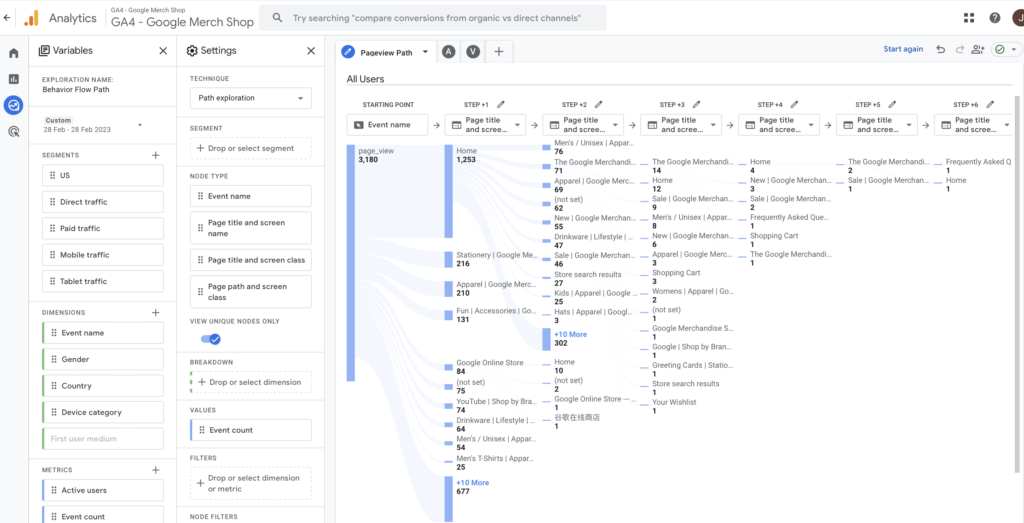
- What pages are frustrating users?
- Where are they getting stuck/ bouncing?
- How are users navigating the site?
- Where are users hesitating?
- What causes users to bounce/leave the site?
- Are users finding and using a page’s main links, buttons, opt-ins, and CTAs?
- Are users experiencing issues across devices?
- How do users rate their experience on the site? How do users think you could improve?
- What is the most searched term on the site that people aren’t finding (so reverting to search)?
- What are the most commonly viewed pages in the lead-up to a sale?
- Which pages aren’t being used in the sale journey?
- How many people click off to social channels?
- How many videos are being used across the site and what is the watch rate?
- Outside the homepage, do people use the top nav? If so, on what pages and to go where?
Understand the user demographics of previous visitors
Ever wondered who your website visitors truly are? GA4 unveils the demographics – age, location, device preferences – painting a clear picture of your audience. Design elements, content style, and overall navigation can all be tailored to resonate with your target visitors.
- What countries do most users come from?
- What language have most users set on their devices?
- What’s the most common age and gender of your users?
- What is the % of mobile v’s desktop v’s tablet users?

Don’t forget about SEO!
Being considerate of SEO throughout the rebuild process is really important to try to limit the impact on rankings. This area is a whole new blog in itself, but don’t forget to check in on your Core Web Vital scores pre and post-build (via the Google Search Console) and ensure you’ve considered the top SEO landing pages in GA4 and analysed how they influence the user journey and steps to the final conversion.
Want to learn more about GA4?
Are you struggling to use GA4 to find the answers to these questions? Maybe you don’t have the data in your account to answer them yet as the relevant tracking isn’t in place or you are unsure how to arrange the data to build the insight. If so, leave a comment below or get in touch with us at [email protected]. You can also stay up-to-date by following GlowMetrics on X, and LinkedIn or by subscribing to our newsletter for the latest tips and news in the world of Digital Analytics and Marketing.
Don’t forget you can also sign up for a free account on our Resource Hub to access a wealth of valuable resources, including exclusive Digital Analytics and Digital Marketing how-to videos and insights across GA4, SEO, PPC and more.

Posted by
Joanne Kearney
Joanne has over 10 years’ experience working in digital analytics, executing and managing many large scale projects across the UK and Ireland. Joanne is also an experienced trainer, having developed many customised corporate training schemes and regularly speaks at digital and analytics events.
Read more from Joanne KearneyBrowse by Category
- Social Media
- SEM
- SEO
- Google Ads
Digital Marketing
- Google Analytics
- Google Tag Manager
- Google Opimize
Digital Analytics

Optimise your website and marketing campaign performance with Ireland’s leading digital analytics agency
Sign up to our newsletterEnjoyed reading this article? Find more like it below…

Posted by
Hannah Magorrian
May 22nd 2024
Digital Analytics Insights
3 min read
A Guide to New Chart Types in Looker Studio
If we’re being honest, we all have our favourite charts in Looker Studio. It can be easy to stay in our visualisation comfort zone with bar charts, pie charts, and...

Posted by
Joanne Kearney
Dec 23rd 2020
5 min read
Goodbye 2020 and Hello Cookie Monster 2021
So this is Christmas, and what have we done? Another year over, and a new one (nearly) begun. Nothing about this year has been normal. We’ve experienced a lot of...

Posted by
Georgia Sloan
May 7th 2024
Digital Analytics Insights
3 min read
Using Report-Level Elements in Looker Studio
Tired of copying and pasting repetitive content across your Looker Studio reports? When you have elements that need to be on every page, it can feel like a chore to...
Leave a Reply