


Top 5 Google Tag Manager Mistakes
Google Tag Manager is a really useful tool – it’s allowed us to help our clients get more out of their analytics implementation and has allowed their marketing teams to take...


Google Tag Manager is a really useful tool – it’s allowed us to help our clients get more out of their analytics implementation and has allowed their marketing teams to take more responsibility for tagging campaigns, taking the strain off IT departments – and while it’s made a lot of lives easier, it can be quite daunting at first and there’s definitely a steep learning curve. Below we’ve listed the Top 5 Google Tag Manager mistakes we’ve come across – they’re quite simple things when you’re working with GTM every day but they’re much more common than you might think!
1) Adding the GTM code and setting up your GA tracking tag but not removing the hard-coded GA code
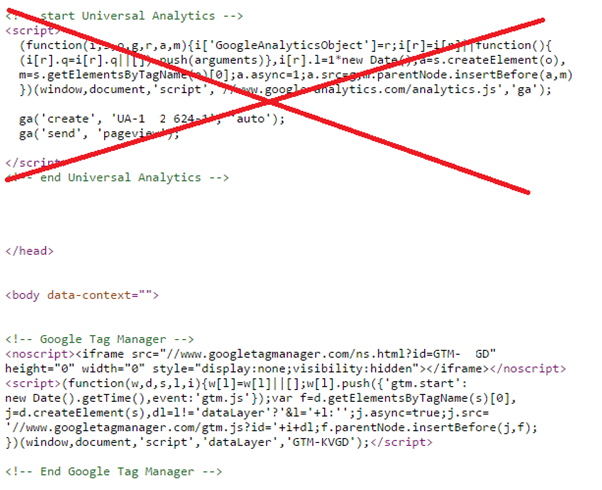
The result? Double-counting every single page-view across your site.
Yes, there are some scenarios where it might be easier to leave your GA code as it was (for example, if you have a lot of customised code on-site) and add GTM for additional tracking but this is rare; it’s better to do everything through GTM if possible. Whatever you do, don’t send two pageviews when there should only be one!
Tip: use Google Tag Assistant to check your implementation.
2) Typos when entering your UA number in the tag configuration
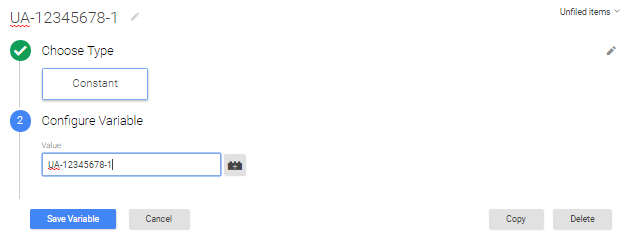
This is surprisingly common and will cause you to send data to someone else’s GA account – big no no! The easiest way to avoid this happening is to simply create a ‘Constant’ Variable for your UA code and then just select it from the drop-down each time. That way there’s no chance of entering it incorrectly.
3) Not setting your firing rules tight enough!
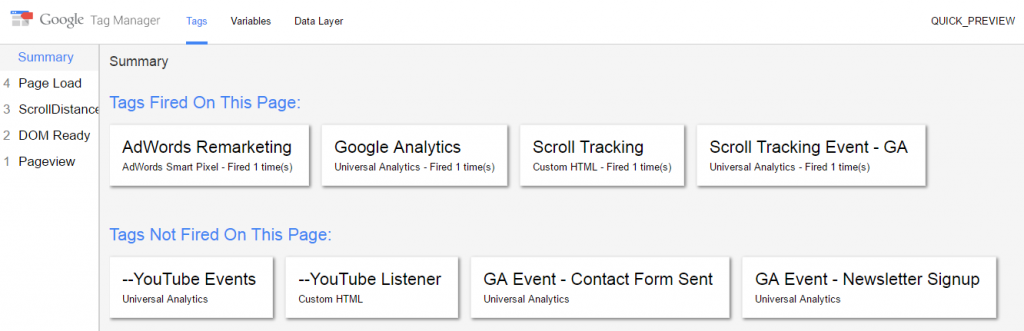
Sometimes we see configurations where *every single click* is being registered in Google Analytics as an event. Not only is this absolutely pointless, it’s a sure fire way to hit your data limits within GA and cause your data to be sampled. Not good.
Make sure when you set a firing rule, don’t just check that your tag fires when you want it to – double-check that it’s not firing when it shouldn’t! Always use GTM’s Preview & Debug mode to understand what’s firing and when.
4) Creating multiple tags when one will do
You might have a number of button clicks or link clicks you want to track – for example, a number of downloadable .PDFs – there’s no need to have a tag for every single button or click if you can capture all of the clicks with a single tag, using a variable to distinguish between the clicks.
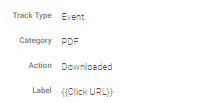
For example, if you want to track .PDF downloads as a GA Event, just set your firing trigger to fire on Click URLs which end with “.pdf”, then set your Event Label as the Click URL! This will send your Event to GA with the URL of the PDF the user clicked on, it’ll track every single PDF across your website and you’ve only needed one tag to do it. In a number of scenarios, there’s often a way to track common actions site-wide using one tag by utilising variables in your Event Actions or Labels.
5) Forgetting to publish your changes!
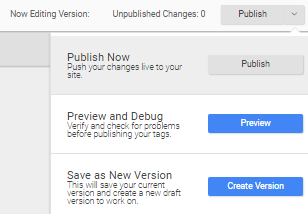
A really obvious one but you’ll be surprised at the number of times we’ve seen new tags added without publishing the changes. If the changes aren’t published, then your new tags aren’t live on your site. Makes sense – and it only needs a button click – but it’s very easy to forget once you’ve done the hard bit.
Hopefully you’ve managed to avoid these mistakes! Have you come across any other common GTM setup mistakes? Let us know in the comments below – and if you have any questions about your GTM setup, feel free to get in touch.

Posted by
Michael Wilson
Michael is the Director of Strategy at GlowMetrics, implementing complex tracking for our largest clients via Google Tag Manager while steering our wider work across the Google Marketing Platform.
Read more from Michael WilsonBrowse by Category
- Social Media
- SEM
- SEO
- Google Ads
Digital Marketing
- Google Analytics
- Google Tag Manager
- Google Opimize
Digital Analytics

Optimise your website and marketing campaign performance with Ireland’s leading digital analytics agency
Sign up to our newsletterEnjoyed reading this article? Find more like it below…

Posted by
Hannah Magorrian
Mar 24th 2025
Digital Analytics Insights
3 min read
Unravelling User Behaviour with GA4’s Path Exploration Reports
Understanding how users navigate your website is crucial for optimising user experience, improving conversions, and identifying potential areas of friction. GA4's Path Exploration reports can help you to map out...


Posted by
Georgia Sloan
Mar 28th 2024
Digital Analytics Insights
2 min read
The Discrepancy Between LinkedIn’s ‘New Followers’ Metric and Actual Page Growth
Have you been using LinkedIn's analytics to track your page's New Follower growth, only to find yourself scratching your head when the numbers don't quite add up? If so, you're...
Posted by
Georgia Sloan
Oct 29th 2024
Google Tag Manager
3 min read
Configuring Built-In Variables in Google Tag Manager
What are Built-In Variables? Built-in variables are pre-defined functions within GTM that automatically capture common information around website interactions. These variables act as placeholders for dynamic values, such as clicked...
Leave a Reply